
Maps for Apple Watch

Offline maps & navigation for Apple Watch. Never lose
your way.

Offline topographic maps, turn-by-turn navigation and workout recording, right on your Apple Watch. Plan on iPhone, sync instantly, and navigate phone-free — even with no signal.

Free to start · No account · No ads

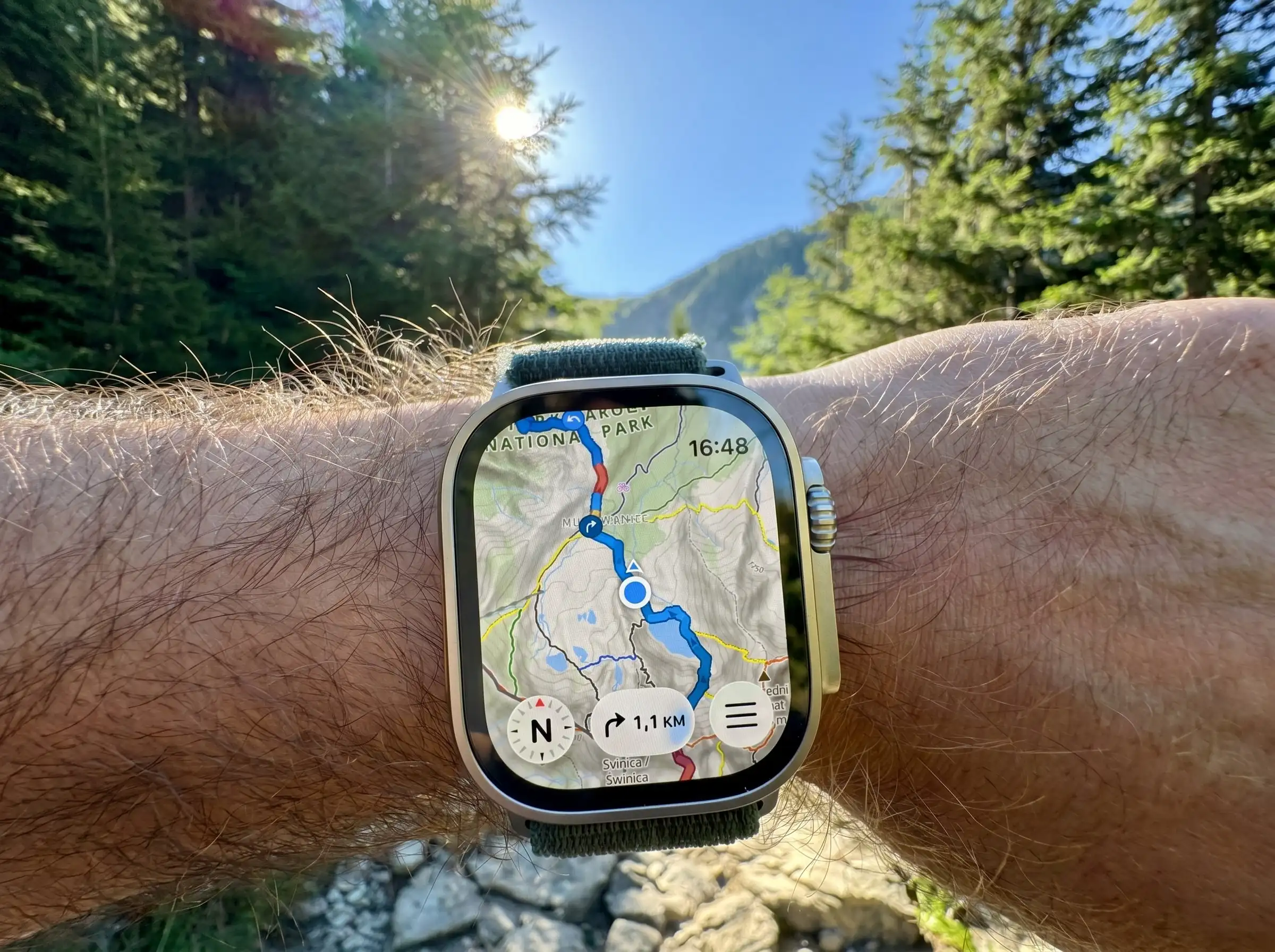
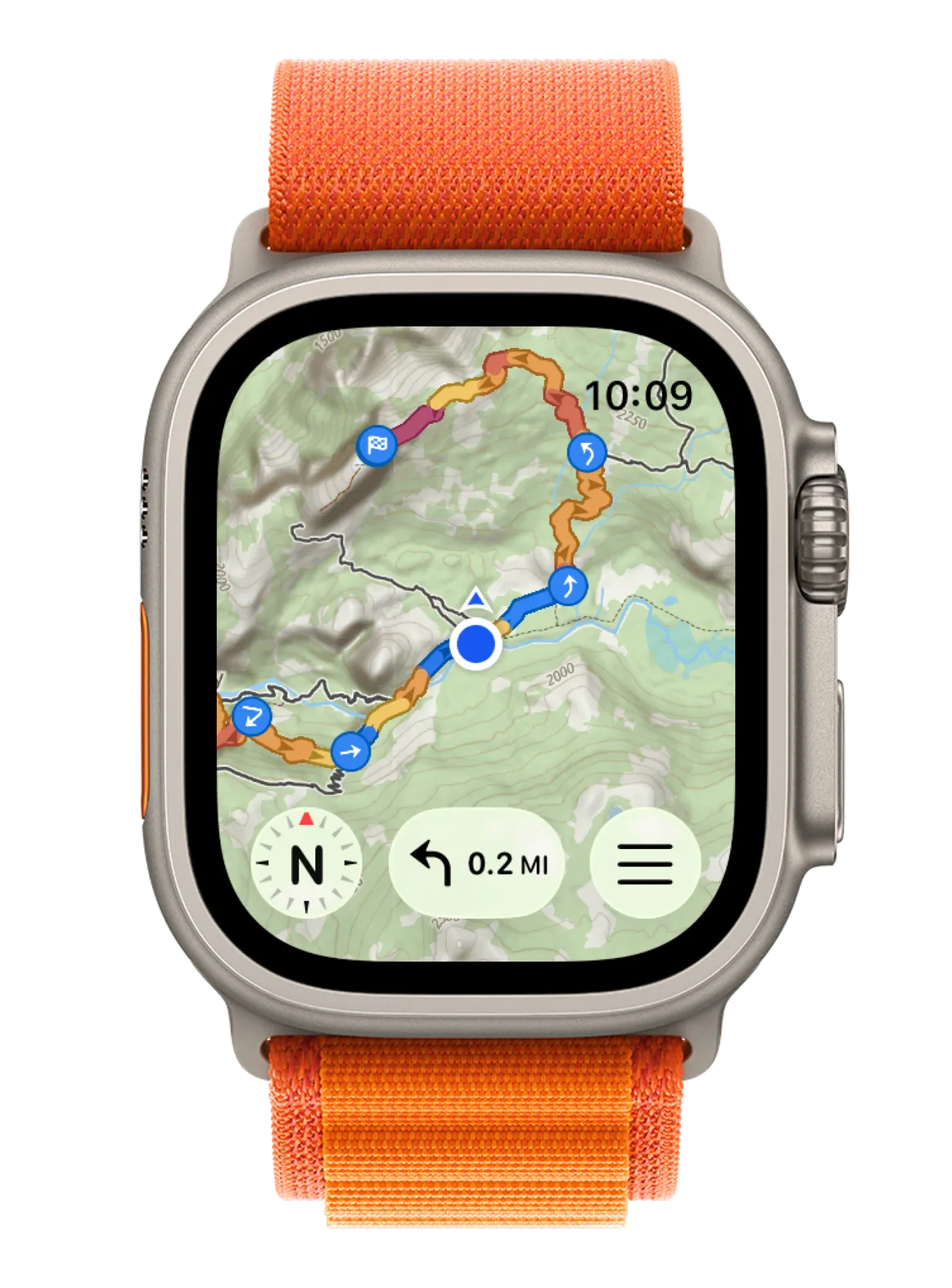
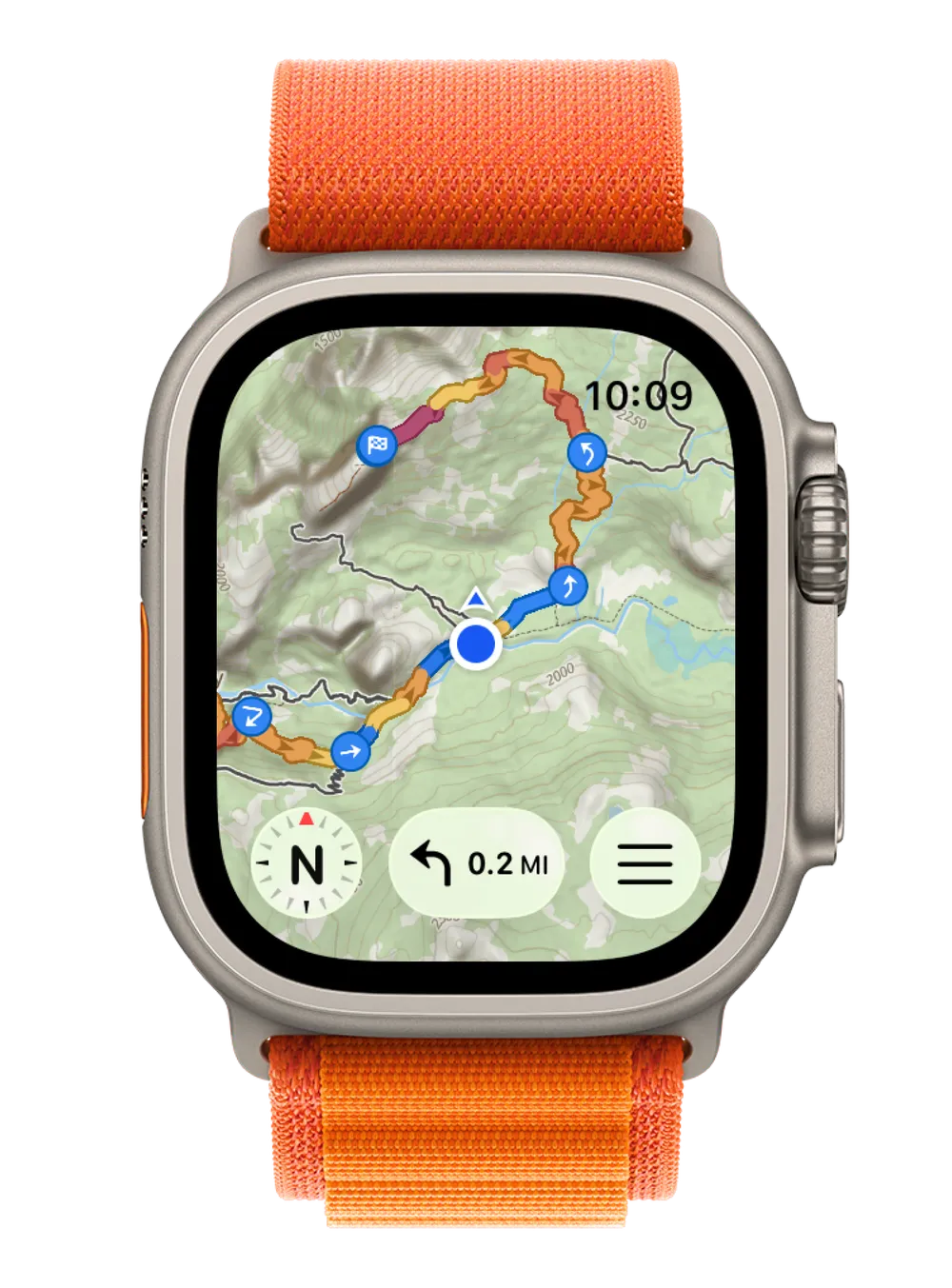
Apple Watch Ultra showing a WristTopo topographic route map with turn guidance
Works offline Private by design Turn-by-turn nav iCloud backup Made for Apple Watch
Plan · Download · Navigate

From plan to summit, in three steps

Build a route on your iPhone, save the map offline with one tap, then head out with nothing but your watch — no signal needed.

Plan → Download → Navigate
1Plan
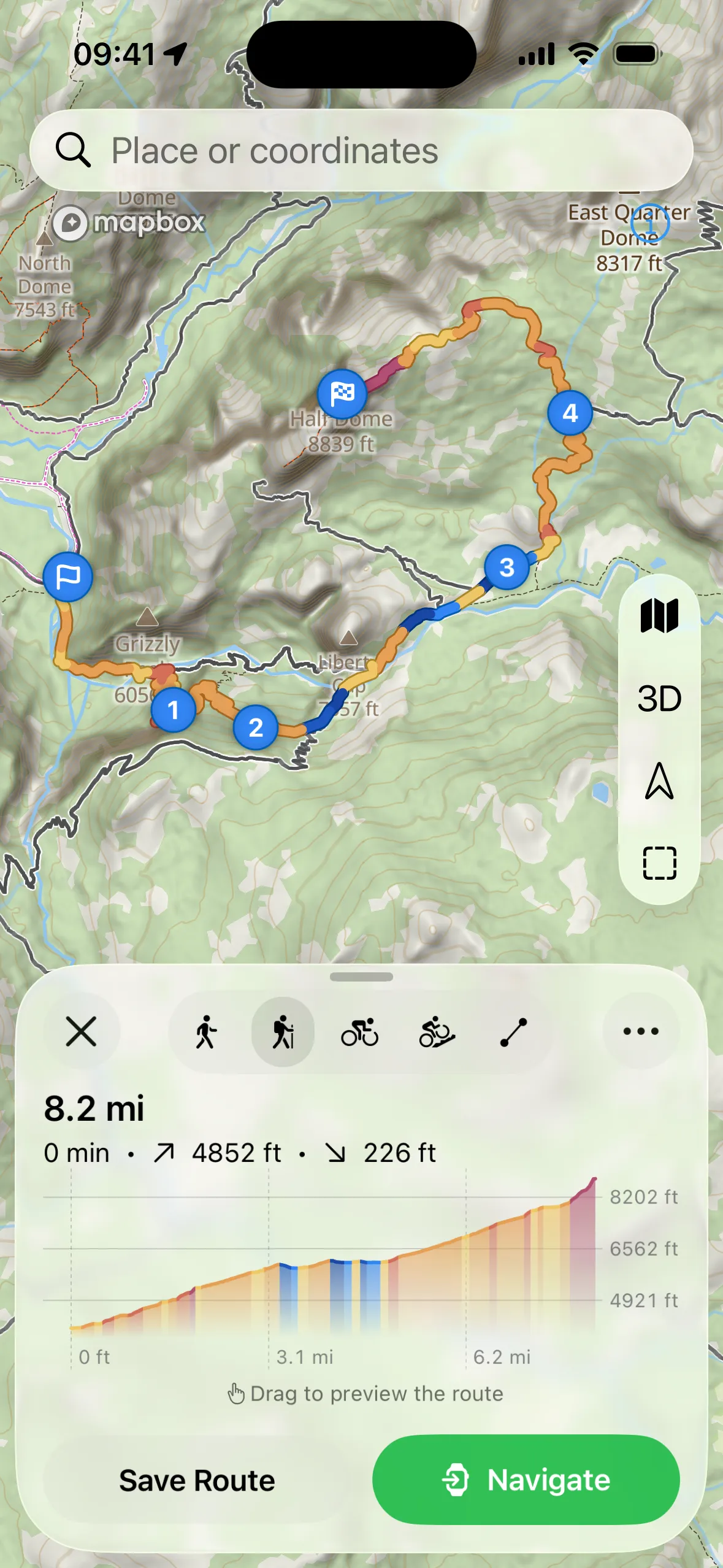
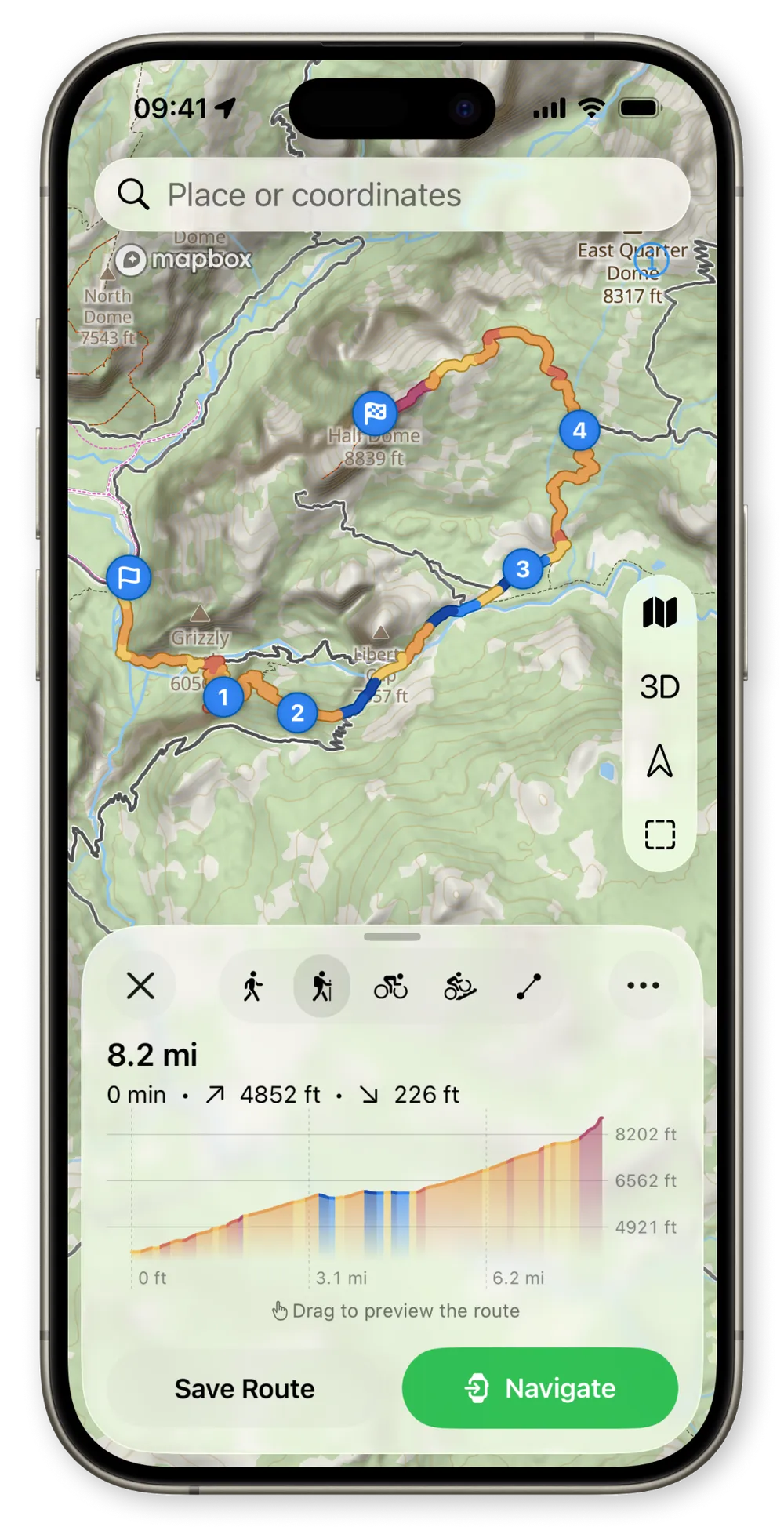
WristTopo iPhone route planner showing a topographic map with numbered waypoints and an elevation profile
2Download
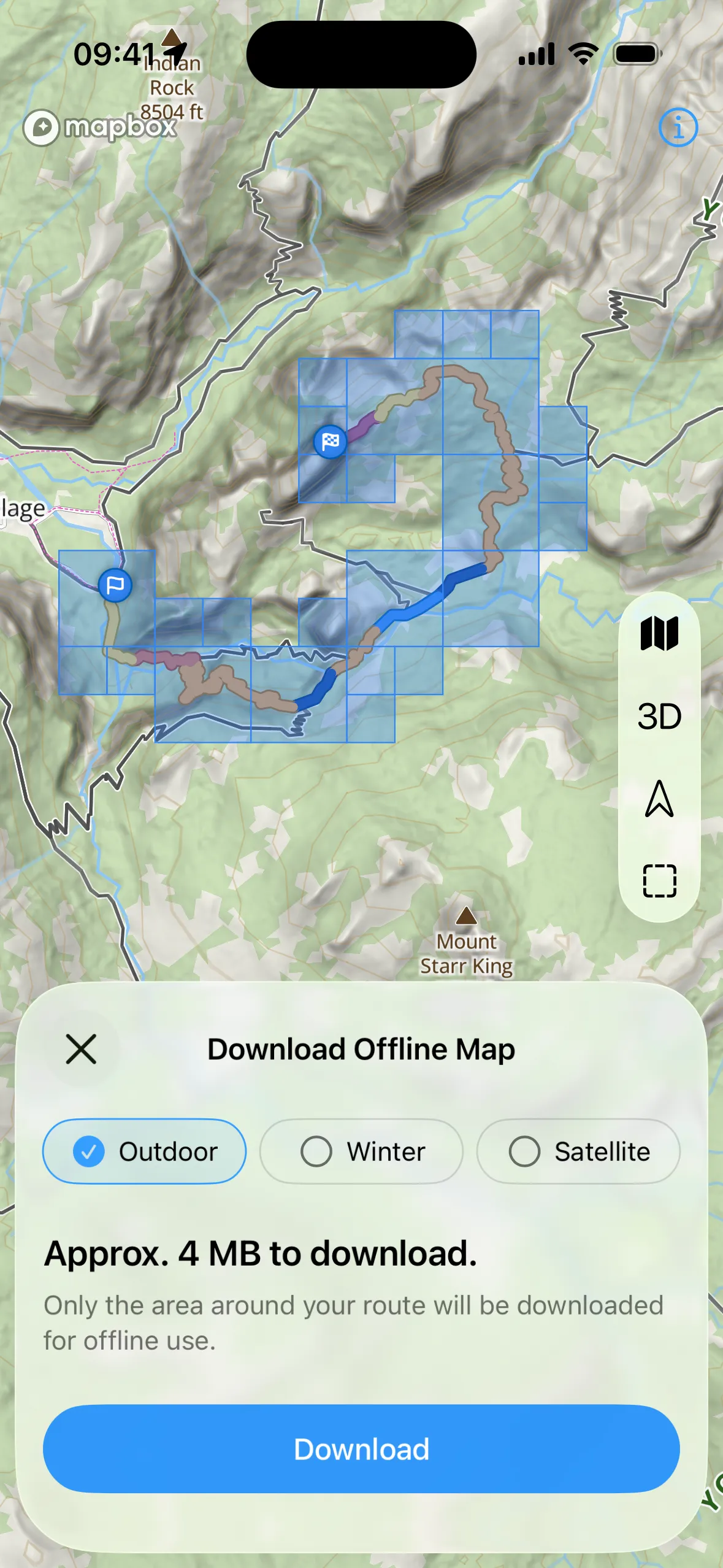
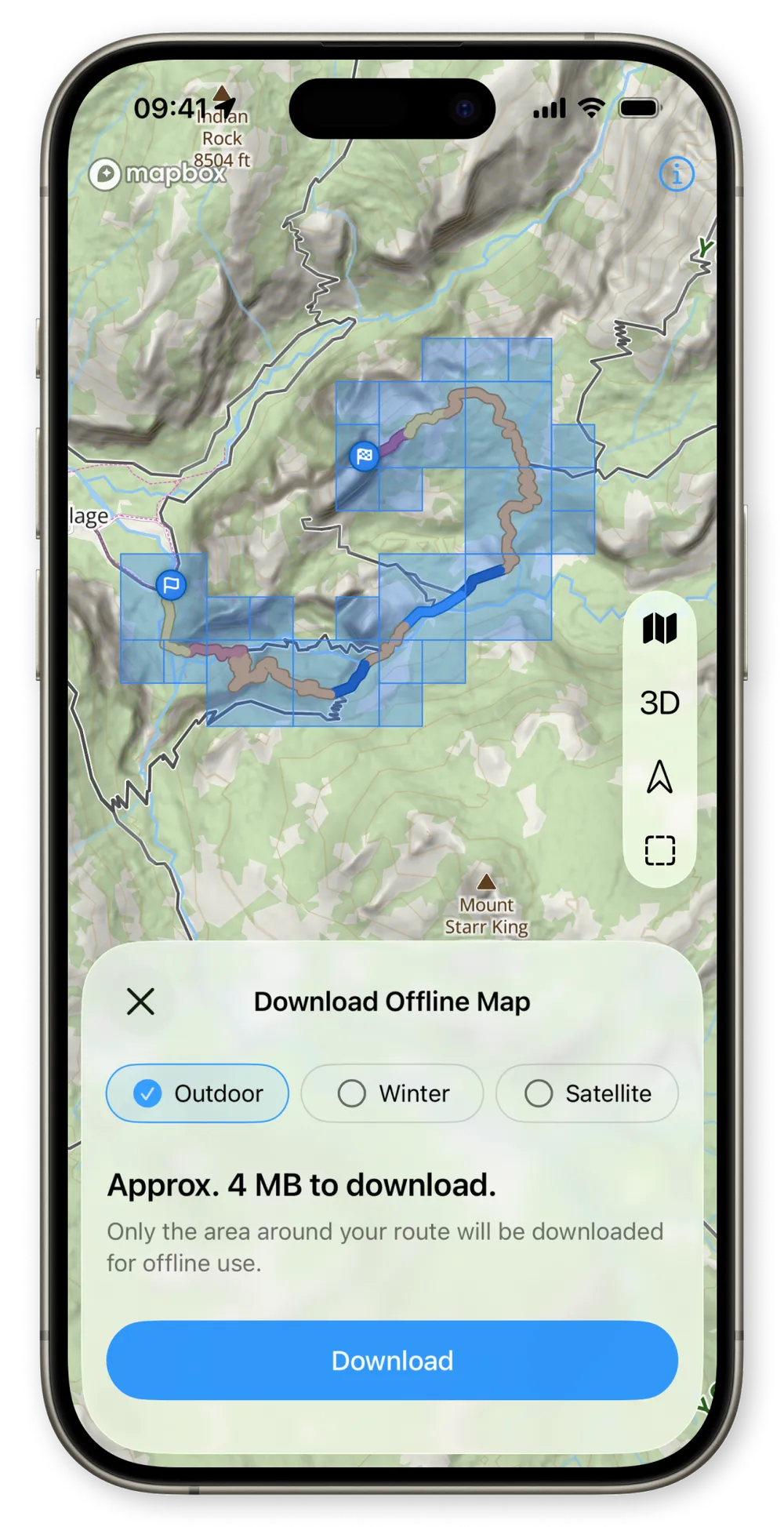
WristTopo iPhone Download Offline Map screen showing the route over selectable map tiles, Outdoor, Winter and Satellite map-type chips, and a Download button
3Navigate
Apple Watch Ultra showing a full route on a topographic map with a turn distance chip and compass
Synced & offline-ready

Plan on iPhone

Tap to drop waypoints or import a GPX. See distance and elevation update instantly.

Download offline maps

One tap downloads the map around your route. Your route’s already on your watch — synced instantly, automatically.

Navigate phone-free

Head out with just your watch. Turn-by-turn guidance, even with no signal.

Core features

Everything you need on the trail

One app, two devices — plan on iPhone, navigate on Apple Watch. Built for hiking, running, cycling, and MTB.

01 · Navigation

Turn-by-turn navigation

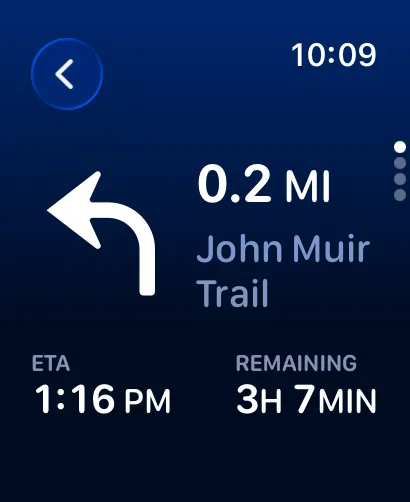
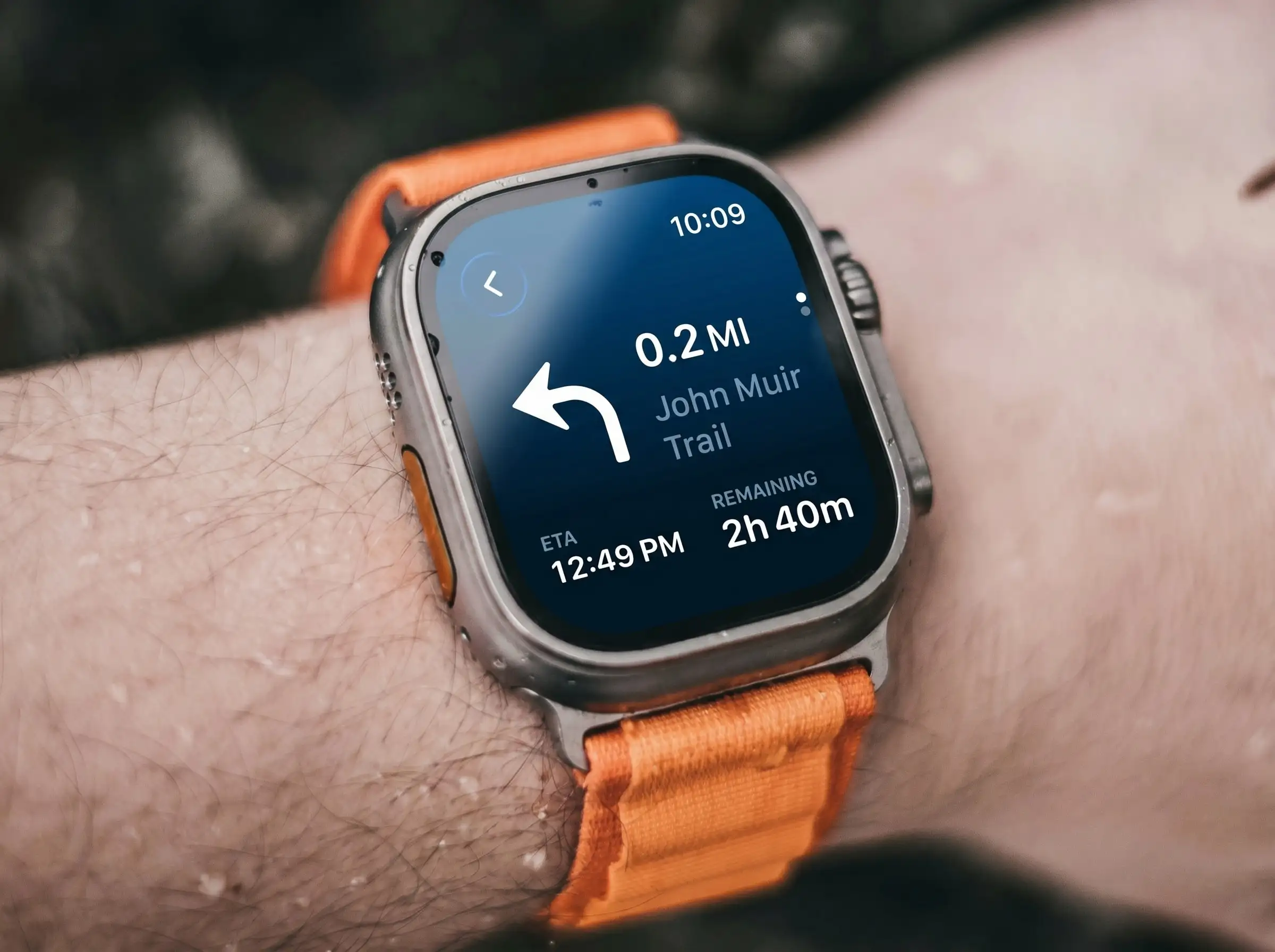
Voice guidance and visual turn alerts on your wrist. See the next turn, distance, and ETA — no phone needed.

Voice + turn alerts
Deep-blue turn-by-turn screen showing a left turn in 0.2 miles on the John Muir Trail

02 · Safety

Backtrack to your start

Lost the trail? One tap retraces your steps with turn-by-turn guidance all the way home.

One-tap return
Backtrack to your start A light topographic map filling the screen: your recorded track runs from home, loops in the middle, and reaches the location puck; the blue backtrack route cuts the loop on the easiest way home.

03 · Maps

Offline maps, for real

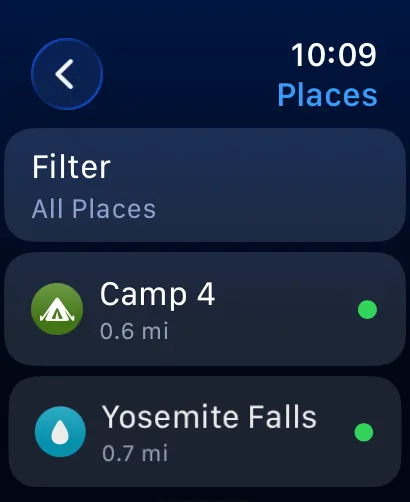
Download summer, winter, or satellite maps to your watch. Once saved, they work with no signal, anywhere.

Works with no signal
WristTopo iPhone Download Offline Map screen with the route over selectable map tiles, Outdoor, Winter and Satellite chips, and a Download button

04 · Planning

Route planner

Drop waypoints and watch your route come alive with instant distance and elevation — for hiking, running, cycling, or MTB.

Live distance + elevation
iPhone route planner showing a topographic map with numbered waypoints and an elevation profile

05 · Workouts

Record every adventure

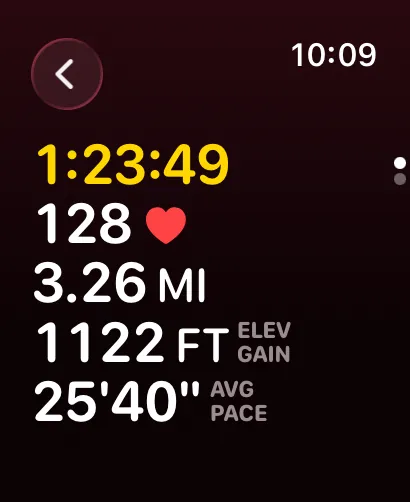
Start a workout from your wrist. Track distance, pace, elevation, and heart rate — saved to Apple Health and counted toward your Activity rings, with no second app draining your battery.

Syncs to Apple Health
Workout stats on watch: timer, heart rate 128, 3.26 miles, elevation gain and average pace

06 · On the go

Quick Route on your watch

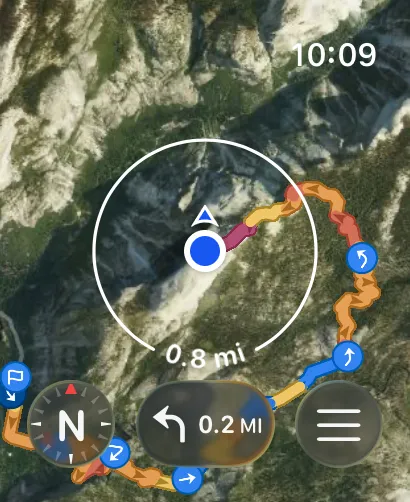
Drop a destination and your watch maps a point-to-point route in seconds — right from your wrist, no phone needed.

Phone-free, on the spot
Point-to-point route created on the Apple Watch over satellite imagery, with a location puck and search-radius ring

07 · Your routes

GPX import

Import GPX from Komoot, Strava or Outdooractive — routes sync to your watch in seconds.

GPX export

Export any route as a GPX file to back it up, or share it with a friend.

Map craft

Read the climb at a glance

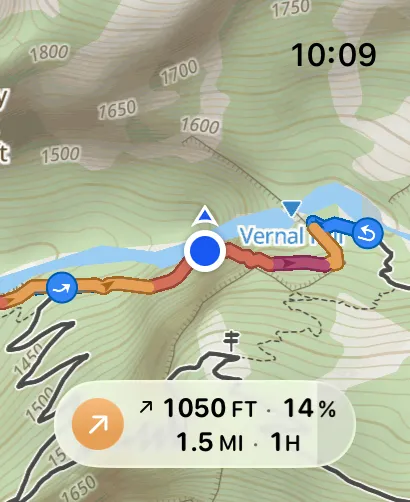
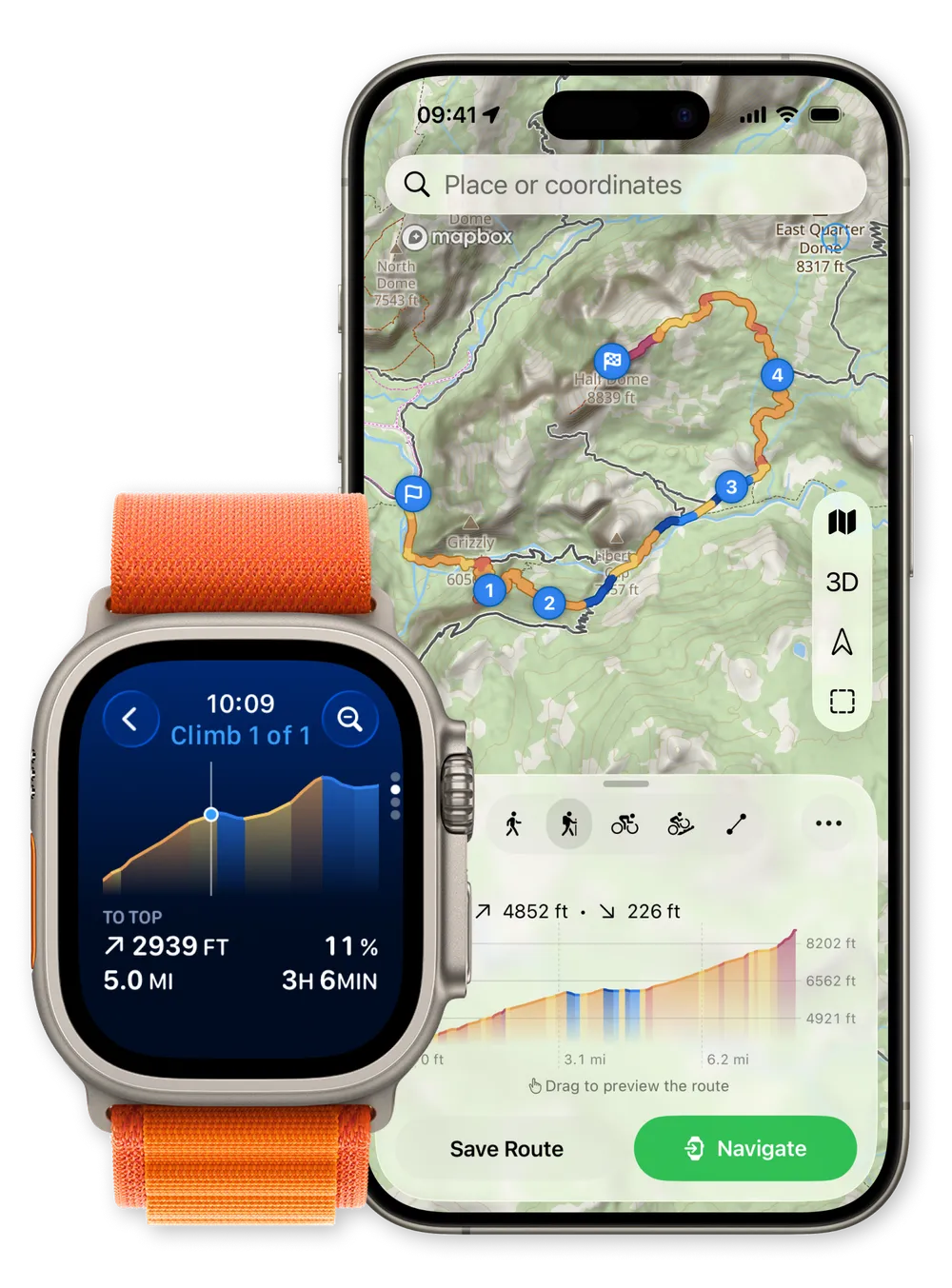
Routes are colored by gradient — orange uphill, blue downhill — with an elevation profile you can read on your iPhone and right on your wrist, so a single look tells you what’s coming. Switch between topo and satellite, on the trail with no signal.

  • Orange uphillThe climb ahead is colored warm — you’ll feel the grade before your legs do.
  • Blue downhillDescents shift cool, with arrows showing your direction of travel.
  • Direction arrowsArrows along the track keep you oriented on topo and real satellite imagery alike.
WristTopo route planner shown together on iPhone and Apple Watch: the iPhone displays a topographic map with a gradient-colored loop route and an elevation profile, while the Apple Watch shows elevation gain 1,946 of 4,863 ft and distance 3.29 of 8.22 mi
For every adventure

One app for every way you move outside

Routing tuned to how you actually move — on foot, on two wheels or on snow. Plan it on iPhone, follow it on your wrist.

Hiking

Topographic contours, trail names and offline maps for every summit.

Trail running

Glanceable wrist guidance, so your eyes stay on the trail — not a screen.

Road running

Routing tuned to roads and paths, with live pace, distance and ETA.

Road cycling

Follow the line and the next turn without ever reaching for your phone.

Mountain biking

Singletrack routing, with the climbs and descents colored right in.

Winter sports

A dedicated winter map with marked ski runs and slope names — for skiing, snowboarding and ski touring.

A hiker standing at a sunlit canyon overlook, arms open to a wide desert vista
Go further

Wander farther.
Always find your way back.

The best views are past the point where most people turn around. Push a little deeper, take the trail you’ve never tried — and let your wrist quietly hold the line home.

Adventure with both feet in. Navigation has your back.

Piotr, the solo developer of WristTopo, smiling on a snowy mountain summit
Built by one person, not a corporation

I build WristTopo on my own. I made it because I wanted to leave my phone in my pack and still trust my watch to bring me home — no accounts, no tracking, just maps that work when you’re out there.

No investors, no ads, no dark patterns — go PRO and you support one developer who hikes the same trails you do, not a corporation. And I read every message: feature requests and bug reports reach the person who writes the code.

Piotr — creator of WristTopo
Press

What the press says

Independently covered by the Apple and outdoor press — and put to the test by heise against Komoot and Strava.

WristTopo meets all my requirements for a modern Apple Watch app.

Original: “WristTopo erfüllt alle meine Anforderungen an eine moderne Apple-Watch-App.”

iPhoneBlog (opens in a new tab) Alex Olma · Germany · translated from German

It turns the Apple Watch into a standalone navigation tool for outdoor tours.

Original: “WristTopo verwandelt die Apple Watch in ein eigenständiges Navigations-Tool für Outdoor-Touren.”

iTopNews (opens in a new tab) Germany · called it a “Geheimtipp” (insider tip) · translated from German
From the App Store

Loved by explorers

What hikers, runners & riders around the world say after taking WristTopo onto the trail — in their own words.

This turns my Apple Watch into a gps mapping machine, and kept me from spending excessive cash just to get a Garmin watch for maps.
dwhitend93 United States

Outstanding, constantly improving app! … WristTopo puts the Apple Watch on par with Garmin and Suunto for hiking and backpacking, other outdoor sports, navigation, route planning, tracking, and in-route information.

Firnspiegel United States

Really impressed by how fluid and straightforward the route creation and map browsing is… Perfect for those that want to use the Apple Workout app but still want to follow a detailed route with turn-by-turn directions. Developer is super friendly and responsive as well!

TrailWalker77 United States

…It turned out to be exactly the missing piece after switching from Garmin to Apple Watch Ultra. The design is outstanding — minimalist, clean… Maps load incredibly fast on the Apple Watch.

pavelsimana Czech Republic

Absolutely the best Apple Watch app for hiking and trail navigation. It lets you navigate trails without needing your phone, which is a game changer… The app's battery efficiency is outstanding.

AchiPL Poland

I expected this app to not work but this app has been better for offline maps for any use than Gaia maps or a lot of other apps. 10/10 app… I love the simple ui and reliable functionality.

gggamer247 United States

Used this app for a three day hike in the Alps and right away purchased it. Super simple to use, fast and just a nice looking app.

FP03089 Germany

Exactly what I needed. I recently climbed the Iztaccíhuatl volcano (5,230 m) and the app was perfect — battery use is almost nil, so I never worried about running out.

Manuel Sanabria 87 Mexico (translated)

Completely blown away how good this app is, connecting to AW Ultra was faultless, map downloads are easy… The route planner is extremely easy to use and sticks to paths very well.

FizzyDizzy! United Kingdom

In an age of endless subscriptions, here's an app with a one-time 'forever' purchase. Intuitive, offline maps on the watch — all upsides. Highly recommend it for the trails.

klabton Poland (translated)

An absolute incredible app that puts a beautiful topo map on your wrist where it’s quick and easy to tell where you are at all times. Highly recommended to all adventurers!

Canuck Evan Holt Canada

Hiking is free with just the watch — no iPhone needed. Easy to get route guidance and info right on the wrist.

라키로 South Korea (translated)

This is the only app that allows to route dynamically on the watch with a topo map without creating the route on your phone. It also has turn by turn navigation and GPX import/export.

TheBBear99 Australia
Pricing

Start free. Go further with PRO.

A real free tier, no account required. Go PRO for just $7.99 a year — or pay once, $29.99 for a lifetime license, no subscription.

Free

$0 · no time limit

Everything you need for shorter adventures.

  • Up to 3 saved routes
  • 3 small offline map regions
  • Plan with up to 5 route points
  • Follow routes on your Apple Watch
Get started free
Recommended

PRO

Unlock the full mountain.

Best value Annual Billed yearly · cancel anytime $7.99/ year
No subscription Lifetime Pay once · no subscription $29.99once
  • Everything in Free, plus:
  • Unlimited routes & larger offline regions
  • Voice-guided turn-by-turn navigation
  • Workout recording with Apple Health sync
  • Quick Route planning on your watch
  • GPX export to share your routes
  • Support independent app development
Try free — upgrade anytime

Launch pricing — lock in today’s rate before it rises. Or pay once for the lifetime license — no subscription. No account required; cancel anytime.

FAQ

Questions, answered

Does it work without my iPhone?
Yes. Once your routes and maps are on your watch, leave the phone behind — WristTopo navigates on Apple Watch with no phone and no signal.
Do I need a cellular Apple Watch?
No. Offline maps and navigation work on any supported Apple Watch — no cellular plan required.
How does WristTopo affect my Apple Watch battery?
It's heavily optimized — the main draw is the GPS hardware itself. And because WristTopo records your workout for you, there's no need to run a second tracking app. Count on a full day of outdoor use on a single charge.
How much storage do offline maps take?
Very little — maps are compressed. A typical route takes just a few MB; a large, complete rectangular area downloaded in full is around 50–100 MB.
Which activities are supported?
Hiking, trail running, road running, road cycling and mountain biking — each with routing tuned to how you move. For winter there's a dedicated ski map with slope names, and you can record skiing, snowboarding and ski-touring workouts to Apple Health.
Can I import my own GPX routes?
Yes. Import a GPX file from Komoot, Strava, Outdooractive — or anywhere — into the iPhone app, and it syncs to your watch instantly, with turn-by-turn directions you can follow by voice.
Is my data private?
Completely. No accounts, no ads, no tracking. Everything stays on your device and your own iCloud.
How much does it cost?
Free to start, with everything you need for shorter trips. PRO unlocks unlimited routes, voice navigation, workout recording, and more.
Wide sunset mountain vista with a lone hiker on a ridge
Ready when you are

Your next adventure is
one tap away.

Download WristTopo and navigate your way — phone-free.

Download on theApp Store

Free to start · No account · No ads